
Best Kitchen Prep Templates
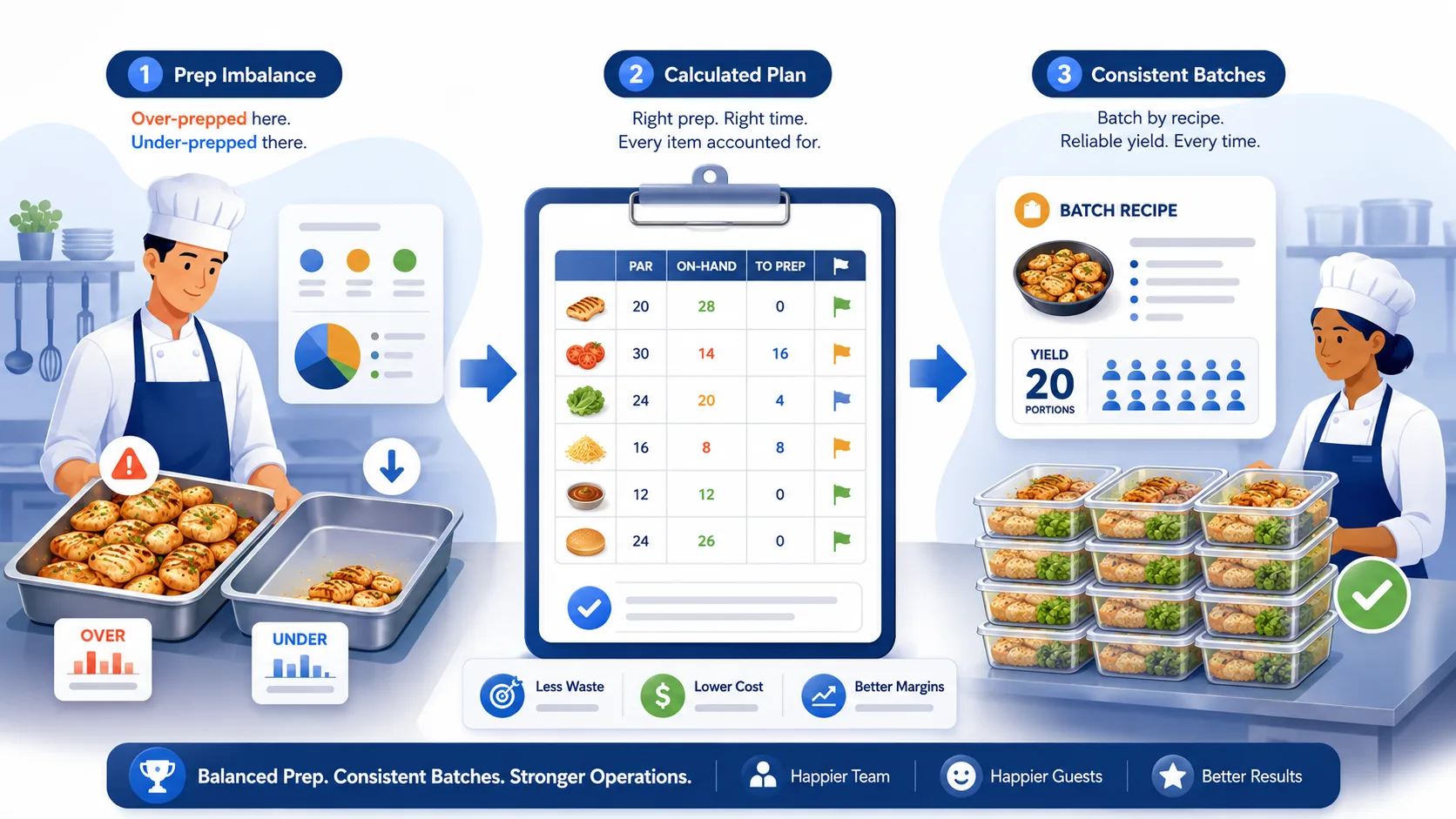
Most kitchen prep lists are just a list of station tasks — "prep sauce, portion proteins, dice vegetables" — with no quantities attached. That works fine until the kitchen either over-preps and throws out unused product at close, or under-preps and runs out mid-service on a Friday. A prep list that doesn't tell the team how much to make is a task list, not a planning tool.
A good prep template does more than remind people what to do. It tells them how much, in what order, and against what standard — which is the difference between prep that matches the day's actual needs and prep that's really just a guess dressed up as a checklist.
TL;DR
- A task-only prep list ("prep the sauce") leads to over-prep or under-prep because it has no quantity target.
- A working prep template needs five elements: item, par level, current on-hand, amount to prep, and priority order.
- Par levels only stay accurate if they're checked against real on-hand counts — a par number nobody updates is a guess with a decimal point.
- Prep tied to a standardized recipe with a defined batch yield produces a consistent amount every time; prep based on "however much looks right" doesn't.
Why Task-Only Prep Lists Fail
A list that says "make the pico de gallo" tells a cook what to do but not how much. Left to fill in that gap themselves, different cooks will prep different amounts depending on how busy they expect the day to be, how much time they have, or simply habit. Multiply that across a full prep list and a kitchen ends up with some items over-prepped and thrown away at close, and others under-prepped and 86'd mid-shift — often in the same week, for opposite reasons.
The fix isn't more detailed instructions on how to make each item. It's adding the piece that's actually missing: how much to make, based on what's already on hand and what the day is expected to need.
The Five Elements of a Working Prep Template
1. Item. Specific enough that there's no ambiguity about what's being prepped — "diced onions, 1/4 inch" rather than just "onions," if size matters for the recipes that use it.
2. Par level. The quantity that should be on hand to comfortably cover expected demand until the next prep cycle. This should be set per item based on actual sales patterns, not a round number picked once and never revisited.
3. Current on-hand. What's actually left from the last prep cycle, checked at the start of prep — not assumed. This is the number that makes the par level useful instead of theoretical.
4. Amount to prep. Par level minus current on-hand. This is the actual instruction — not "prep pico de gallo," but "prep 6 quarts of pico de gallo," calculated from the other three numbers rather than eyeballed.
5. Priority order. Not every item on the list matters equally if time runs short. Items with a short shelf life, high sales velocity, or that block other prep (a base sauce other dishes depend on) should be marked to go first.
A Worked Example
| Item | Par Level | On-Hand | To Prep | Priority | Batch Yield Reference |
|---|---|---|---|---|---|
| Pico de gallo | 8 qt | 2 qt | 6 qt | High | 1 batch = 4 qt |
| Cilantro-lime rice | 20 lb | 6 lb | 14 lb | High | 1 batch = 10 lb |
| Marinated chicken | 25 lb | 4 lb | 21 lb | High | Portioned individually |
| Queso sauce | 3 gal | 1.5 gal | 1.5 gal | Medium | 1 batch = 1.5 gal |
| Pickled onions | 2 qt | 1.25 qt | 0.75 qt | Low | 1 batch = 2 qt |
With par level and on-hand both recorded, "to prep" is a calculation, not a judgment call — and priority tells the team that if service interrupts prep, pico de gallo and marinated chicken get finished before pickled onions.
Why Par Levels Drift Without Regular Checking
A par level set once — during opening, or after a menu change — reflects demand at that moment. Sales patterns shift: a dish becomes more popular, a seasonal item's demand changes, a new menu item pulls volume from an old one. If nobody revisits the par level, the prep list keeps targeting a demand pattern that no longer exists, and the gap between what's prepped and what's actually needed grows quietly over weeks.
The fix isn't a rigid quarterly review — it's checking the "on-hand" number against the par level regularly enough to notice when an item is consistently over or under, and adjusting the par level itself when that pattern shows up, not just the day's prep amount.
Why Batch Yield Matters for Prep Consistency
A prep template only works if "one batch" means the same amount every time. If a recipe says a batch of queso yields 1.5 gallons but one cook's batch comes out closer to 1.25 gallons, the prep template's math is off before the shift even starts — the team thinks they've hit par when they haven't.
This is what a standardized, batch-yield-based recipe protects: total batch ingredient cost divided by actual batch yield gives a reliable per-unit number, and — just as importantly for prep planning — a reliable total yield per batch. When the batch yield is consistent, "how many batches do I need to hit par" becomes simple math instead of a guess.
How Par Level Maps to Min/Max Settings
"Par level" is kitchen shorthand, not a universal system field. In an inventory platform built around recipes, the closer equivalent is usually a Min/Max range set on the item — and because a recipe's batch yield defines what one inventory unit of that item represents (a queso recipe with a 1.5-gallon batch yield means one unit of queso in inventory is 1.5 gallons), Min and Max end up expressed in batch-count terms, not gallons directly. A Min of 3 and a Max of 7 means the target range is 3 to 7 batches, not 3 to 7 gallons.
When the current count falls below Min, that gets flagged as low stock, with a suggested reorder quantity of Max minus the current count. If current stock is 2 batches against a Min of 3 and a Max of 7, the suggested reorder is 5 — five batches. Turning that into an actual prep quantity — 5 batches × 1.5 gallons = 7.5 gallons — is one multiplication using the batch yield already on the recipe. That conversion is a manual step, not something the system calculates for you, but it's a much smaller gap to close than reconstructing a par level from memory.
How Dinezy supports this. Dinezy lets you set Min and Max levels on any inventory item, including a recipe once its batch yield makes it a stocked item — and flags anything below Min with a suggested reorder quantity (Max minus current count) in the dashboard's low-stock list. Recipes store a defined batch yield, so that reorder count converts to a real prep quantity with one multiplication instead of a guess. The current count behind that calculation comes from the same submit-and-approve workflow used across the rest of inventory, so it's a reviewed number, not an estimate.
Frequently Asked Questions
How many items should be on a daily prep template? Start with the items that have the shortest shelf life or the highest sales volume — usually 8 to 15 items for a mid-size kitchen. Trying to template every prep item on day one usually collapses under its own complexity. Add items gradually as the format proves useful.
Should par levels be different for weekdays versus weekends? Yes, if sales volume varies meaningfully by day. A single par level averaged across the week either over-preps on slow days or under-preps on busy ones. Day-specific par levels take more setup but produce prep amounts that actually match demand.
What's the difference between a prep template and a prep checklist? A checklist confirms tasks were completed. A template calculates how much of each item to make, based on par level and current on-hand. Many kitchens have the checklist and skip the template — which is why over-prep and under-prep persist even when every task on the list gets checked off.
How do I set an initial par level if I don't have sales data yet? Start with a reasonable estimate based on expected covers and menu mix, then adjust weekly based on what's actually running out or getting thrown away. A par level is a starting hypothesis, not a permanent number — the first few weeks are about correcting it toward reality.
Key Takeaways
- A prep list without quantities leads to over-prep and under-prep in the same week, for opposite reasons
- A working template needs five elements: item, par level, current on-hand, amount to prep, and priority order
- Par levels drift when sales patterns shift and nobody revisits them — check them regularly, not just once at setup
- Consistent batch yield from standardized recipes is what makes "how many batches to hit par" a simple calculation instead of a guess
- A par level maps to a Min/Max range in batch-count terms; the system can suggest how many batches to reorder, but converting that to an actual prep quantity is one multiplication you do using the batch yield
Dinezy lets you set Min and Max levels on any recipe-linked inventory item, and flags anything below Min with a suggested reorder quantity — Max minus current count — in the dashboard. Recipes store a defined batch yield, so that count converts to an actual prep quantity with one multiplication, and every count behind it goes through the same submit-and-approve review as the rest of your inventory. Try Dinezy free at dinezytech.com.